The Problem
For years, my personal finance system lived inside a Google Sheet.
Every month started with the same routine.
Create a new tab.
Copy the previous month's data.
Update salary numbers.
Add recurring expenses.
Check whether I had paid the electricity bill.
Check whether I had transferred money to my wife.
Check whether I had sent money to my father.
Calculate how much money should remain in one bank account and how much should be moved to another.
The process worked.
In fact, it worked surprisingly well.
The spreadsheet helped me stay disciplined with my finances for years.
But over time, I started noticing something.
I wasn't using a spreadsheet anymore.
I was using a spreadsheet to simulate an application.
Every month, I was manually repeating the same workflow. The same recurring expenses. The same calculations. The same payment tracking.
The spreadsheet was doing the job of a product that didn't exist.
Yesterday, I finally decided to build that product.
Five hours later, Finna was deployed and running at finance.ghazikhan.in
The interesting part is not that I built a finance application in five hours.
The interesting part is that I did not write a single line of code.
Everything was generated using Claude Code.
As a Staff Engineer with more than a decade of experience building software, that statement would have sounded ridiculous to me even a year ago.
Today, it feels like a glimpse into how software development is changing.
This is the story of how I turned years of personal finance habits into a working application using Claude Code, a well-defined PRD, a set of specialized AI agents, and a development workflow that compressed what would normally take me a week into a single evening.
Why I'm Sharing This Before The App Has Been Fully Tested
Most project case studies are written after months of usage, once everything has been validated in production.
This one is different.
I deployed Finna yesterday.
Normally, I would wait a few months before writing about a project like this. The recurring expense workflow still needs to survive a real month transition, and I am certain I will discover improvements as I continue using it.
But I wanted to document this journey while everything is still fresh in my mind.
The reason is simple.
The most interesting part of this story is not whether Finna becomes the perfect finance application.
The most interesting part is how the application came to life.
In a single evening, I went from a Google Sheet that I had been maintaining for years to a working product running in production.
The application itself is still evolving.
The development workflow that made it possible is already changing how I think about building software.
The Problem: My Spreadsheet Was Slowly Becoming an Application
If you work in a salaried job, especially in India, there is a good chance your monthly finances follow a predictable pattern.
Salary comes in.
EMIs go out.
Mutual fund SIPs get deducted.
Insurance payments happen.
Money gets transferred to family members.
Bills need to be paid.
Whatever remains becomes available for discretionary spending.
My spreadsheet was built around exactly this workflow.
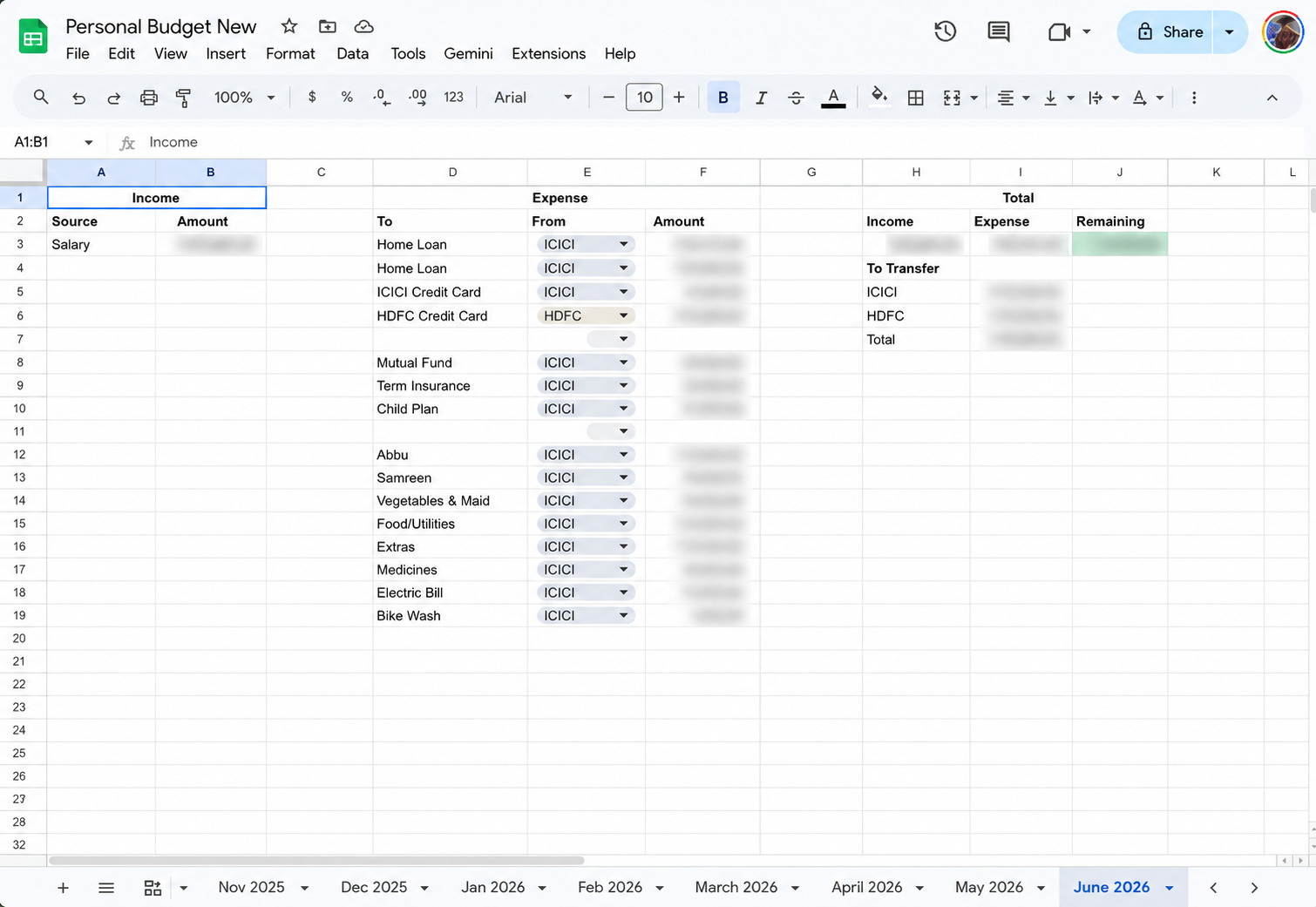
Every month had its own sheet.
Inside that sheet, I tracked:
- Salary income
- Home loan payments
- Mutual fund investments
- Term insurance
- Child investment plans
- Family transfers
- Daily expenses
- Remaining balance
I also maintained two bank accounts.
One account was used for day-to-day expenses.
The other account was used primarily for savings and long-term planning.
This created another recurring task every month.
I needed to calculate exactly how much money should be transferred between accounts.
The spreadsheet handled this reasonably well, but it required manual effort.
The bigger problem was payment tracking.
Some payments were automated.
Some were manual.
Every month I found myself asking the same questions:
- Did I already pay the electricity bill?
- Did I transfer money to my wife?
- Did I send money to my father?
- Did I miss any recurring payment?
The answers existed somewhere in banking applications, SMS notifications, or transaction histories.
The spreadsheet itself could not help me.
It was simply storing numbers.
There were no reminders.
No status tracking.
No workflow.
No concept of completed versus pending payments.
As more months passed, the number of tabs kept growing.
The data was there.
The visibility was not.
At some point, I realized that I did not need a better spreadsheet.
I needed a purpose-built application.
Why I Didn't Use an Existing Finance App
Whenever I describe this problem, the first question people ask is:
"Why not just use an existing finance app?"
It is a fair question.
There are plenty of options available.
Some focus on expense tracking.
Some focus on budgeting.
Some focus on investment tracking.
Some try to do everything.
I explored several options.
The problem was not that they were bad products.
The problem was that none of them matched the workflow I had already developed over years of managing my finances.
I specifically needed:
- Multiple account management
- Monthly budget planning
- Recurring expense carry-forward
- Manual payment checklists
- Income and expense tracking
- Account transfer calculations
- Mobile-friendly usage
- Full ownership of my data
Most applications solved pieces of the problem.
None solved the complete workflow.
And every time I tried adapting my process to fit an existing product, I ended up going back to the spreadsheet.
Eventually I reached a simple conclusion.
The fastest way to get exactly what I wanted was to build it myself.
The challenge was finding the time.
And that is where Claude Code entered the story.
Why Claude Code Instead of Building It Manually?
I have been building software professionally for more than a decade.
If I wanted to build Finna manually, I could.
The problem was never capability.
The problem was time.
As engineers, we often underestimate how much effort exists before the first real feature gets built.
Before I could even start working on budgeting features, I would need to:
- Setup authentication
- Configure MongoDB
- Create database models
- Design API contracts
- Build reusable UI components
- Configure TypeScript
- Setup routing
- Create hooks
- Setup React Query
- Configure deployment
- Configure PWA support
- Design the application architecture
None of that directly solves the user's problem.
It is necessary work, but it is still setup work.
In a typical side project, that setup alone can consume several evenings.
I did not want another unfinished side project.
I wanted a working application.
That is why I chose Claude Code.
Not because I wanted AI to make decisions for me.
Not because I wanted AI to replace engineering.
But because I wanted AI to handle implementation while I focused on architecture, product decisions, workflows, and business rules.
The biggest misconception about AI-assisted development is that you simply open a chat window and ask it to build something.
That approach works for demos.
It does not work for products.
What made this project successful was not Claude Code itself.
It was the preparation that happened before Claude Code wrote a single file.
The Idea Wasn't Built in 5 Hours. The Code Was.
When people hear that Finna was built in approximately five hours, they often assume the entire idea appeared and was implemented during those five hours.
That is not what happened.
The implementation took five hours.
The requirements took years.
Every recurring expense.
Every payment reminder.
Every account transfer calculation.
Every monthly workflow.
All of that had already been refined through years of using my spreadsheet.
I knew exactly what I wanted.
I knew exactly what was frustrating.
I knew exactly which workflows mattered.
What I lacked was an implementation.
So before writing any code, I sat down with Claude Code and explained my current process.
I shared screenshots of my spreadsheet.
I explained what each section meant.
I walked through how I calculate monthly budgets.
I described how money moves between accounts.
I explained which payments are automatic and which ones require manual action.
I described what happens at the beginning of every month.
I described what happens during the month.
I described what happens when the month ends.
Only after all of that did we start discussing the application.
The first goal was not code.
The first goal was clarity.
Turning Years of Habits Into a PRD
One of the biggest lessons from this project is that AI performs dramatically better when requirements are explicit.
After discussing the workflow, Claude Code helped me convert everything into a proper Product Requirements Document.
The final PRD became the single source of truth for the entire project.
Instead of relying on prompts and memory, every feature, workflow, and engineering decision was documented.
The PRD that defined workflows, data models, phases, APIs, and UI requirements for Finna.
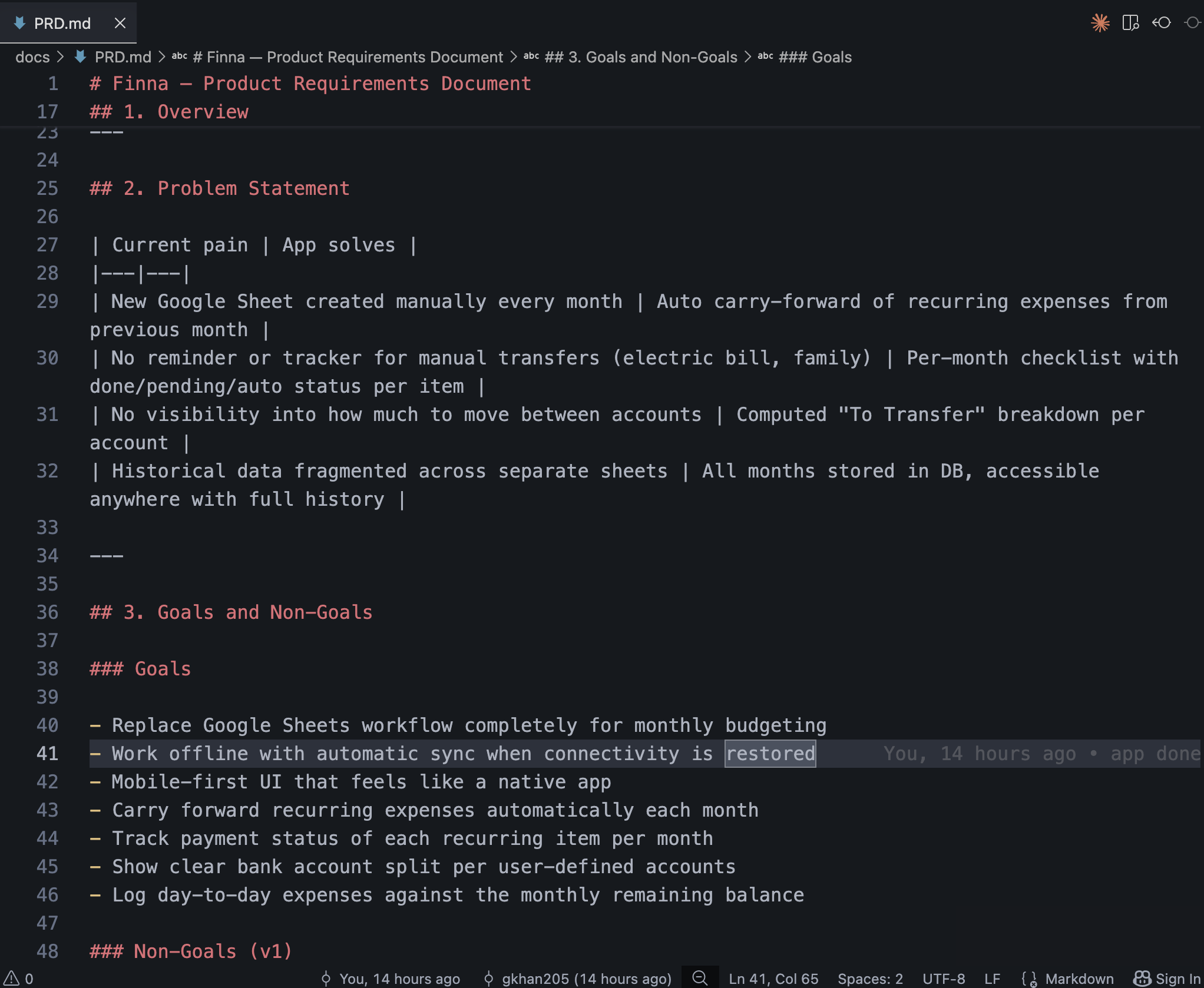
The PRD included:
- Product goals
- User flows
- Data models
- Database collections
- API endpoints
- UI components
- Engineering constraints
- Phase breakdowns
- Dependencies between features
The project eventually expanded into nine phases.
Some examples included:
Phase 1
- Project setup.
- Authentication.
- Database configuration.
- Core infrastructure.
Phase 2
- Account management.
- Creating user-defined bank accounts.
- Supporting multiple account types.
Phase 3
- Monthly budget workflows.
- Income tracking.
- Expense tracking.
- Recurring expense handling.
Phase 4
- Checklist management.
- Manual versus automated payments.
- Status tracking.
Phase 5
- Dashboard and reporting.
- Balance calculations.
- Account split visibility.
And so on.
The important detail is that every phase had clearly defined responsibilities.
Claude Code never had to guess what came next.
Everything already existed inside the PRD.
Creating CLAUDE.md
The next step was creating a file that would act as the engineering handbook for the project.
This file was called CLAUDE.md.
Think of it as onboarding documentation for a new engineer joining the team.
Except the engineer was Claude Code.
Every time a session started, Claude Code could read these rules and understand how the project should be structured.
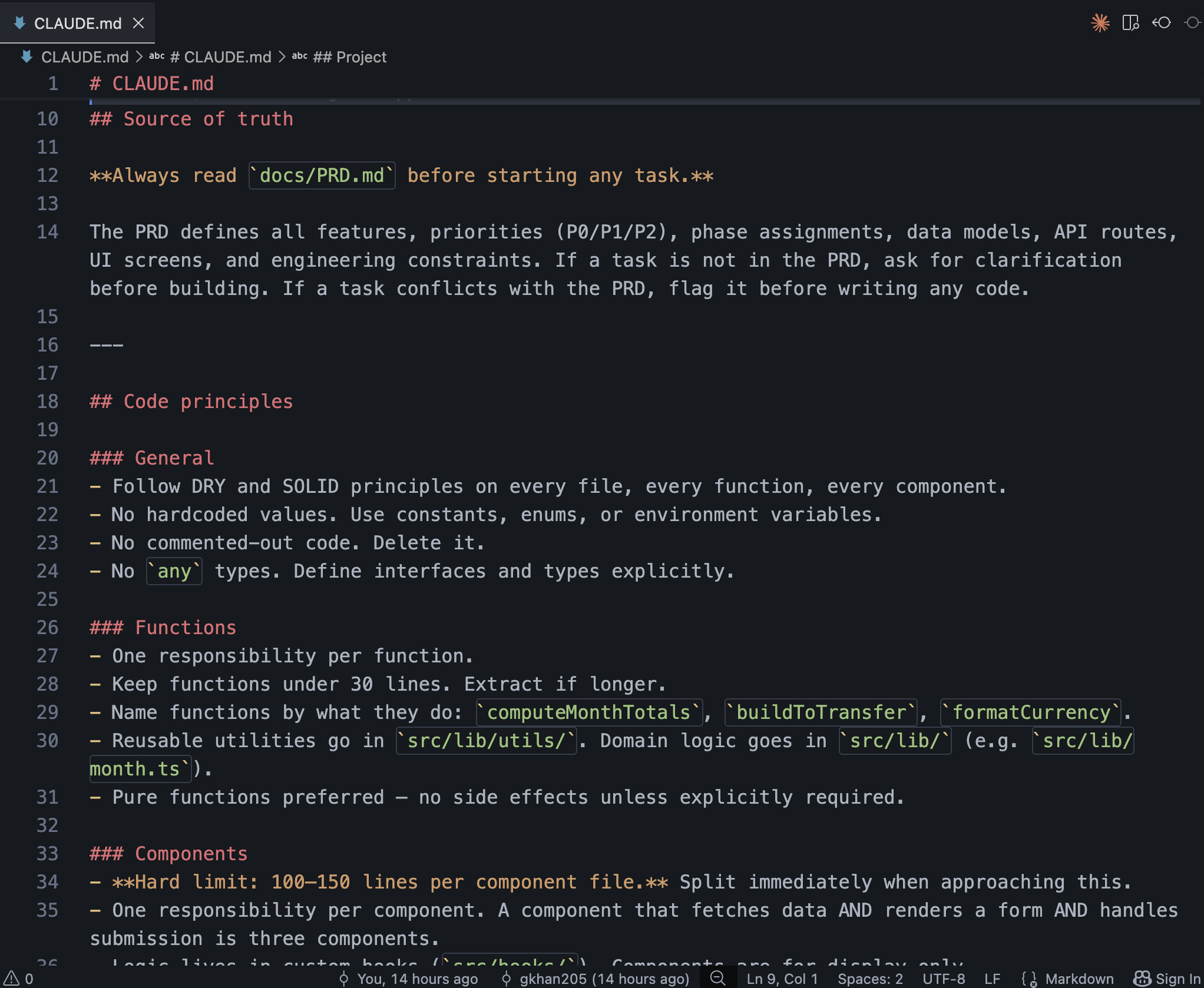
Some of the rules included:
Component Size Limits
Components should remain small and focused.
Target size:
- 100 to 150 lines
- Single responsibility
- Presentation focused
Large components should be split automatically.
Hook-First Architecture
Business logic should never live inside components.
Components should be responsible for rendering.
Hooks should be responsible for:
- Data fetching
- State management
- Mutations
- Derived calculations
This keeps components predictable and easier to maintain.
UI Standards
The application should use:
- TailwindCSS
- shadcn/ui
- Mobile-first layouts
No custom component libraries.
No random UI patterns.
Everything should remain consistent.
Database Rules
Read operations should be optimized.
Validation should happen server-side.
Financial calculations should never trust client values.
Totals should always be recalculated by the API.
These rules may sound obvious.
But the important thing is that they were documented.
Claude Code was no longer generating code based on assumptions.
It was generating code within clearly defined constraints.
Creating Specialized AI Agents
This was probably the most interesting part of the project.
Instead of treating Claude Code as one general-purpose assistant, I created multiple specialized agents.
Each agent had a specific role.
Each agent had its own responsibilities.
Each agent had its own rules.
For example:
API Agent
Responsible for:
- API routes
- Authentication checks
- Validation
- Database operations
Rules included:
- Validate session first
- Recalculate financial totals server-side
- Use optimized database queries
- Return consistent API responses
Component Agent
Responsible for:
- UI components
- Layouts
- Forms
- Responsive design
Rules included:
- No business logic
- Split large components
- Follow shadcn patterns
- Keep mobile-first design
Hook Agent
Responsible for:
- React Query
- Mutations
- Local state
- Data orchestration
Rules included:
- API communication only through hooks
- Consistent caching strategy
- Shared business logic
Instead of asking Claude Code to "build a feature", I could tell a specific agent to perform a specific task.
The difference in consistency was noticeable almost immediately.
The output became more predictable.
The architecture remained cleaner.
And the project felt much closer to working with a real engineering team than a generic AI assistant.
The Slash Commands That Turned Claude Code Into a Development Team
One thing I wanted to avoid was constantly repeating instructions.
I did not want every conversation to look like:
Build this component.
Follow these architecture rules.
Read the PRD.
Check dependencies.
Follow the component guidelines.
Make sure authentication is implemented.
That quickly becomes repetitive and error-prone.
Instead, I created a set of custom slash commands.
These commands became the primary interface between me and Claude Code.
/start-phase
This was probably the most important command in the entire workflow.
Instead of immediately generating code, the command would:
- Read the PRD
- Understand the selected phase
- Identify dependencies
- List every file it planned to create
- Explain the implementation approach
- Wait for confirmation
Only after approval would code generation begin.
This solved one of the biggest problems with AI-assisted development.
Premature implementation.
Rather than generating hundreds of lines of code and hoping they were correct, Claude Code first presented a plan.
That gave me an opportunity to review architecture decisions before any files were created.
A typical workflow looked like this:
/start-phase 3
Claude Code would respond with:
- Goals of the phase
- Features included
- Files to be created
- Database changes
- API routes
- Components
- Hooks
- Dependencies
Only after I approved the plan would development start.
/build-feature
This command focused on a specific feature.
For example:
/build-feature account-management
The command would automatically follow the project's architecture.
It would generate:
- Types
- Database model
- API routes
- React Query hooks
- UI components
- Validation
Because the workflow was predefined, every feature looked consistent.
The structure never drifted.
/build-component
This command focused purely on UI.
For example:
/build-component ChecklistPanel
The command automatically enforced:
- Hook-first architecture
- Small component size
- Mobile-first layouts
- shadcn/ui usage
The result was significantly cleaner code than a generic prompt.
/review
One of my favorite commands.
/review src/components/month/MonthSheet.tsx
Instead of generating new code, Claude Code would audit existing code against the rules defined inside CLAUDE.md.
It checked:
- Component size
- Architecture violations
- Missing abstractions
- Logic inside components
- Data flow issues
This effectively turned Claude Code into both the developer and reviewer.
Architecture Decisions That Saved Me Future Refactoring
One thing I learned years ago is that most side projects fail because of poor architecture decisions made too early.
The goal was not to over-engineer Finna.
The goal was to make decisions that would not become painful six months later.
Why I Chose a PWA Instead of React Native
The first major decision was platform selection.
The application is something I primarily use from my phone.
Naturally, React Native was the first option that came to mind.
But after thinking about it, I realized I was solving the wrong problem.
I did not need a mobile app.
I needed validation.
I needed to know whether this workflow actually improved my monthly financial planning.
A Progressive Web App was the fastest path to validation.
Benefits included:
- Single codebase
- Faster development
- No App Store approval
- Works on desktop and mobile
- Installable on the home screen
- Shared backend if a native app is built later
If Finna proves itself over the next few months, converting the frontend to React Native will be straightforward because the backend architecture remains unchanged.
Why MongoDB Instead of PostgreSQL
This decision was surprisingly easy.
Budgeting data is naturally document-oriented.
A monthly budget contains:
- Income sources
- Expenses
- Checklist items
- Account allocations
- Monthly summaries
Most of this data belongs together.
I was not dealing with complex relational queries.
I was not joining twenty tables together.
I was storing structured monthly financial documents.
MongoDB felt like a natural fit.
A simplified structure looked something like:
{
  month: "2026-06",
  incomes: [],
  expenses: [],
  checklistItems: [],
  transfers: [],
  accounts: []
}
MongoDB Atlas also provided a generous free tier.
For a personal project, that made the decision even easier.
Why Better Auth Instead of NextAuth
Authentication was another area where I wanted simplicity.
This application is primarily for me.
I did not need:
- Email/password authentication
- Password resets
- Magic links
- Enterprise login
I simply needed:
- Google login
- Secure sessions
- MongoDB support
Better Auth checked all the boxes.
It integrates nicely with MongoDB.
The setup felt straightforward.
Most importantly, it kept the authentication layer small and focused.
The Account Model Refactor
This was one of the most valuable decisions made during development.
Initially, the application assumed specific bank accounts.
Something like:
- ICICI
- HDFC
At first, this felt reasonable because those were the accounts I use.
Then I asked myself a simple question.
What happens if someone else wants to use Finna?
The answer was obvious.
The entire design breaks.
So before building too much on top of it, I stopped and refactored.
Instead of hardcoded accounts, I introduced a proper Account model.
Every relationship became account-driven.
Transfers referenced accounts.
Expenses referenced accounts.
Income referenced accounts.
The application became significantly more flexible.
This was one of those decisions that cost almost nothing early but would have been painful later.
The Moment Finna Became Real
After several phases were completed, I reached the point where I could finally enter real data.
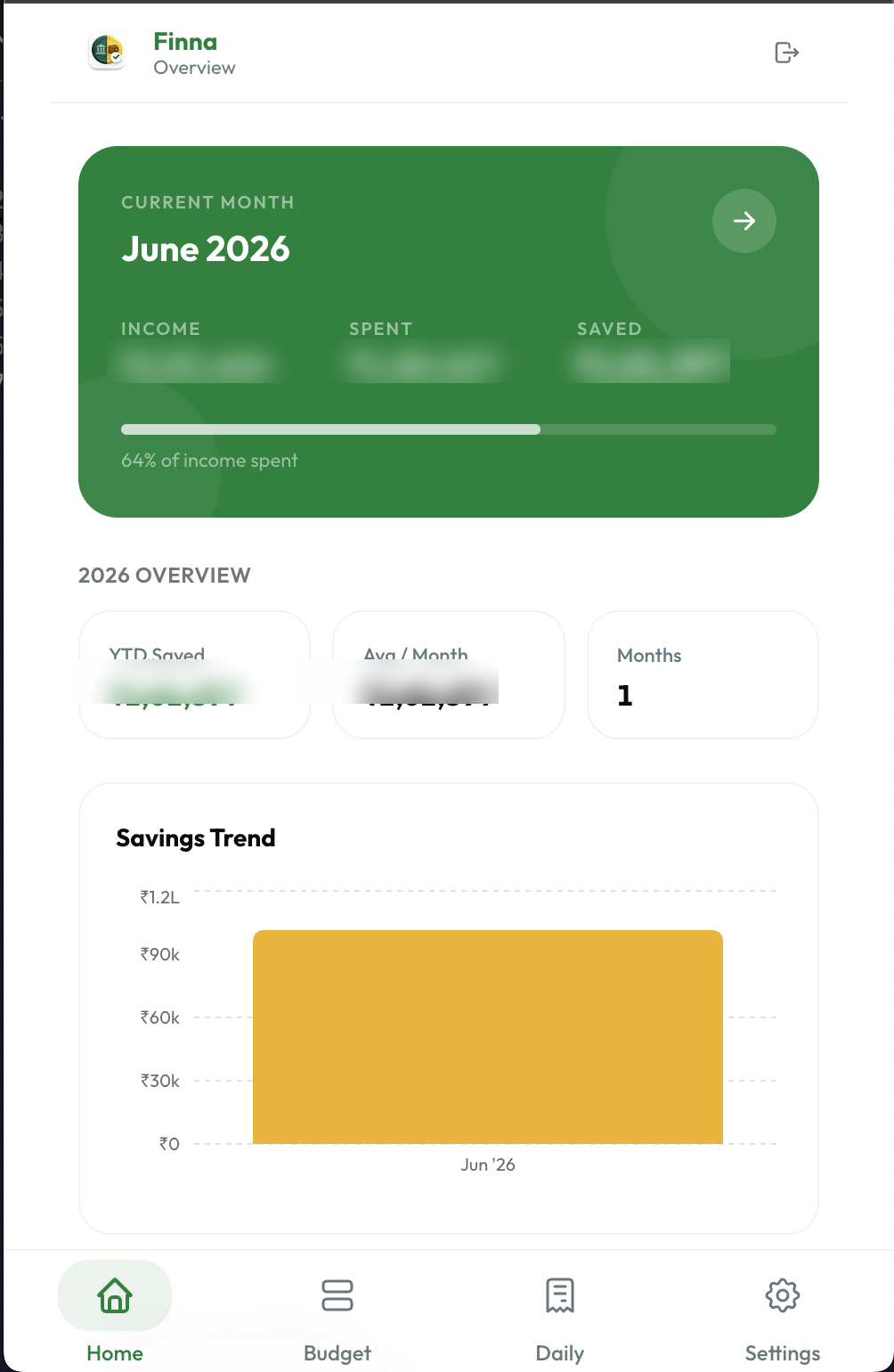
This was the moment I had been waiting for.
I started adding:
- Income sources
- Recurring expenses
- Investments
- Insurance payments
- Family transfers
- Account balances
For the first time, the application was running against the same information stored in my spreadsheet.
And then something interesting happened.
The numbers matched.
The remaining balance matched.
The account split calculations matched.
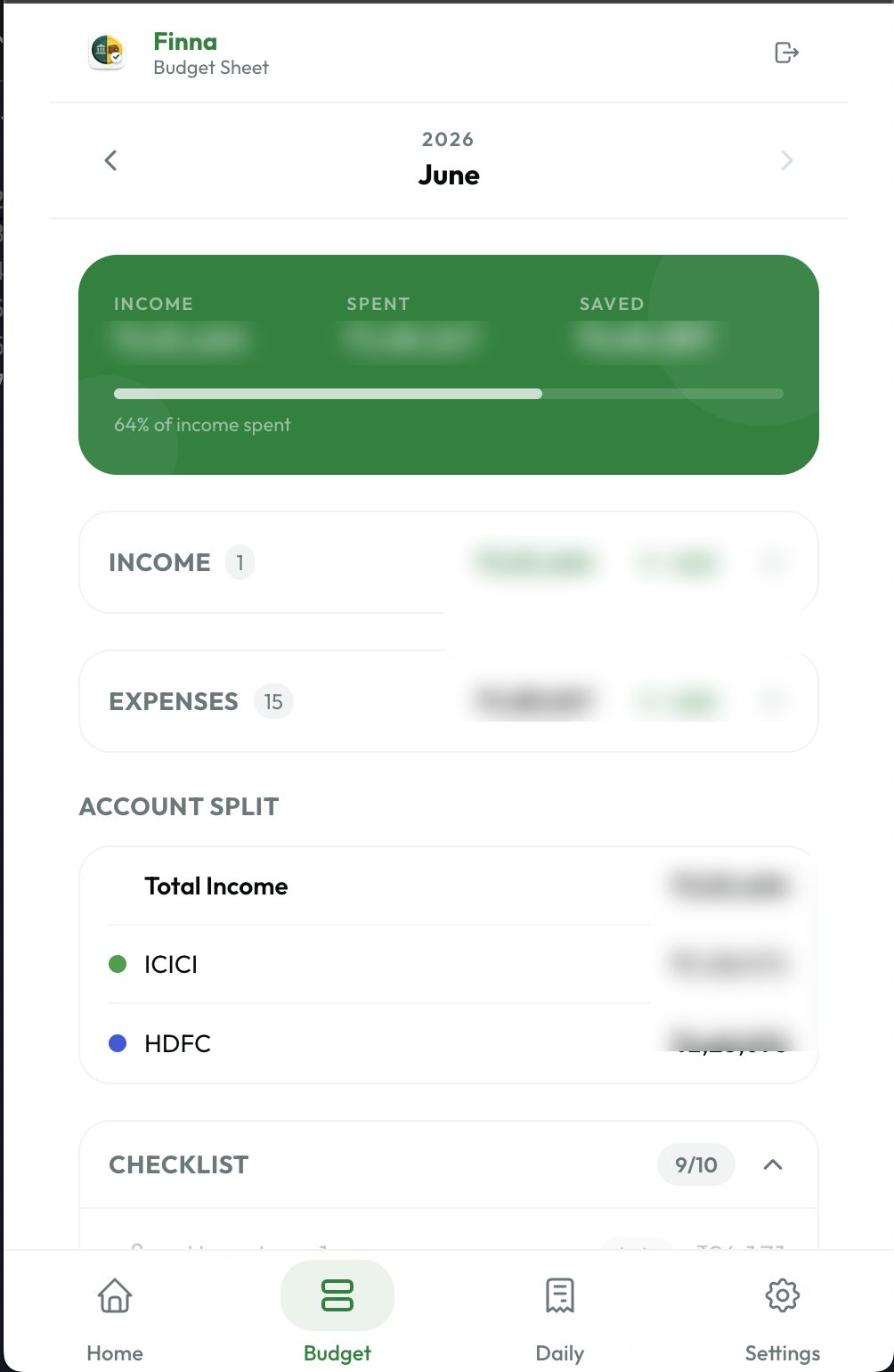
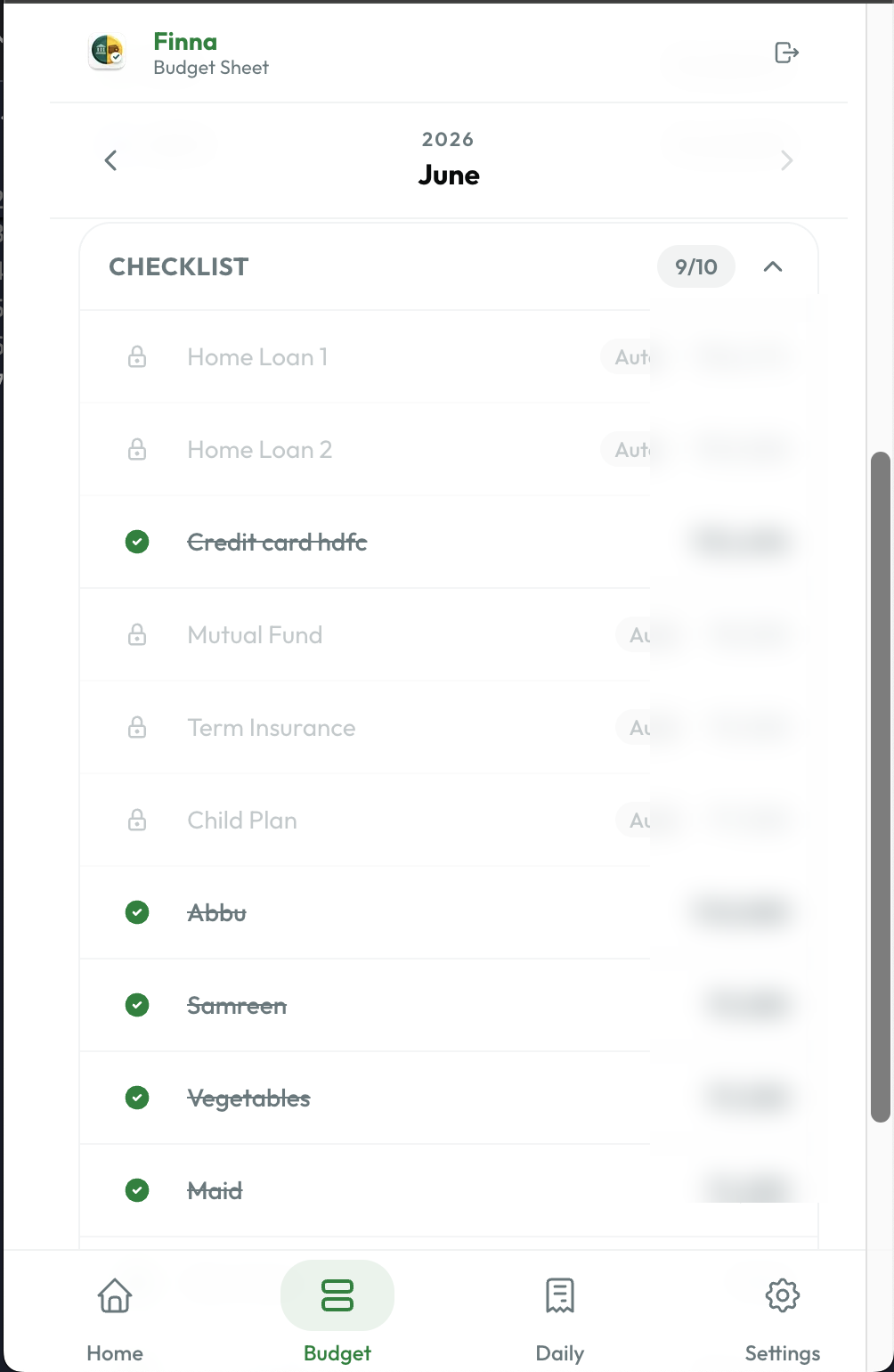
The recurring expense structure matched.
The monthly overview matched.
The checklist workflow felt better than the spreadsheet.
This was the first moment where Finna stopped feeling like a side project and started feeling like a real product.
For years, the spreadsheet had been the source of truth.
Now I had a dedicated application producing the same answers while providing a significantly better user experience.
That was the moment I realized this project was worth continuing.
What Worked Surprisingly Well
Whenever I start a new side project, I expect things to go wrong.
Usually there is a framework issue.
A deployment issue.
An architectural mistake.
A feature that sounded simple but turns into a rabbit hole.
Finna was surprisingly smooth.
I think the biggest reason was the amount of planning that happened before implementation started.
The PRD Became the Single Source of Truth
Every decision eventually traced back to the PRD.
When Claude Code needed context, it read the PRD.
When I needed to validate scope, I checked the PRD.
When a new feature was discussed, the PRD determined whether it belonged in the current phase.
This removed a lot of ambiguity.
Instead of constantly making decisions during implementation, most decisions had already been made.
The Agent-Based Approach Produced Better Code
This was one of the biggest surprises.
Giving Claude Code a role dramatically improved consistency.
A generic prompt often produces generic results.
A specialized API agent that understands authentication, validation, financial calculations, and database rules produces much more predictable output.
The same applied to hooks, components, and architecture.
The agents effectively acted like specialized members of a development team.
Phase-Based Development Prevented Scope Creep
One of the easiest ways to kill a side project is trying to build everything at once.
I have done this before.
Most developers have.
You start with a small idea.
Then you add analytics.
Then notifications.
Then AI features.
Then reporting.
Then exports.
Then integrations.
Before you know it, the project becomes overwhelming.
The phase-based approach kept everything focused.
At every stage there was only one question:
What does the current phase require?
Nothing more.
Nothing less.
That made progress surprisingly fast.
What Required Iteration
Not everything worked perfectly.
Some parts required additional thinking.
Mobile UX Needed a Dedicated Pass
Even though the instructions mentioned mobile-first design, the initial implementation still leaned toward desktop patterns.
This is a common issue.
Building responsive layouts is not the same as building mobile experiences.
Several improvements were required:
- Larger tap targets
- Better spacing
- Numeric keyboards for amount inputs
- Improved form interactions
- Better layouts for smaller screens
- More compact financial summaries
Since Finna will primarily be used from my phone, these improvements were important.
The Offline Strategy Is Not Finished Yet
One of the planned features was offline-first support.
The architecture already accounts for it.
The plan is:
- Save changes locally first
- Queue operations
- Synchronize when connectivity returns
The implementation will use:
- IndexedDB
- Service workers
- Workbox
- Sync queues
However, I intentionally postponed completing this feature.
I wanted to validate the core budgeting workflow first.
Building offline synchronization is interesting engineering work.
Solving the actual user problem is more important.
At this stage, budgeting accuracy matters more than offline support.
Real Usage Will Reveal New Requirements
The application was deployed yesterday.
That means there are still things I do not know.
The biggest test is still ahead.
The month rollover workflow.
Recurring expenses are one of the main reasons Finna exists.
When the next month begins, I will find out whether the workflow feels as seamless as I intended.
I expect to discover improvements.
I expect to refine the UX.
I expect to adjust some business rules.
That is part of the process.
Real users always reveal things planning cannot.
In this case, the first real user is me.
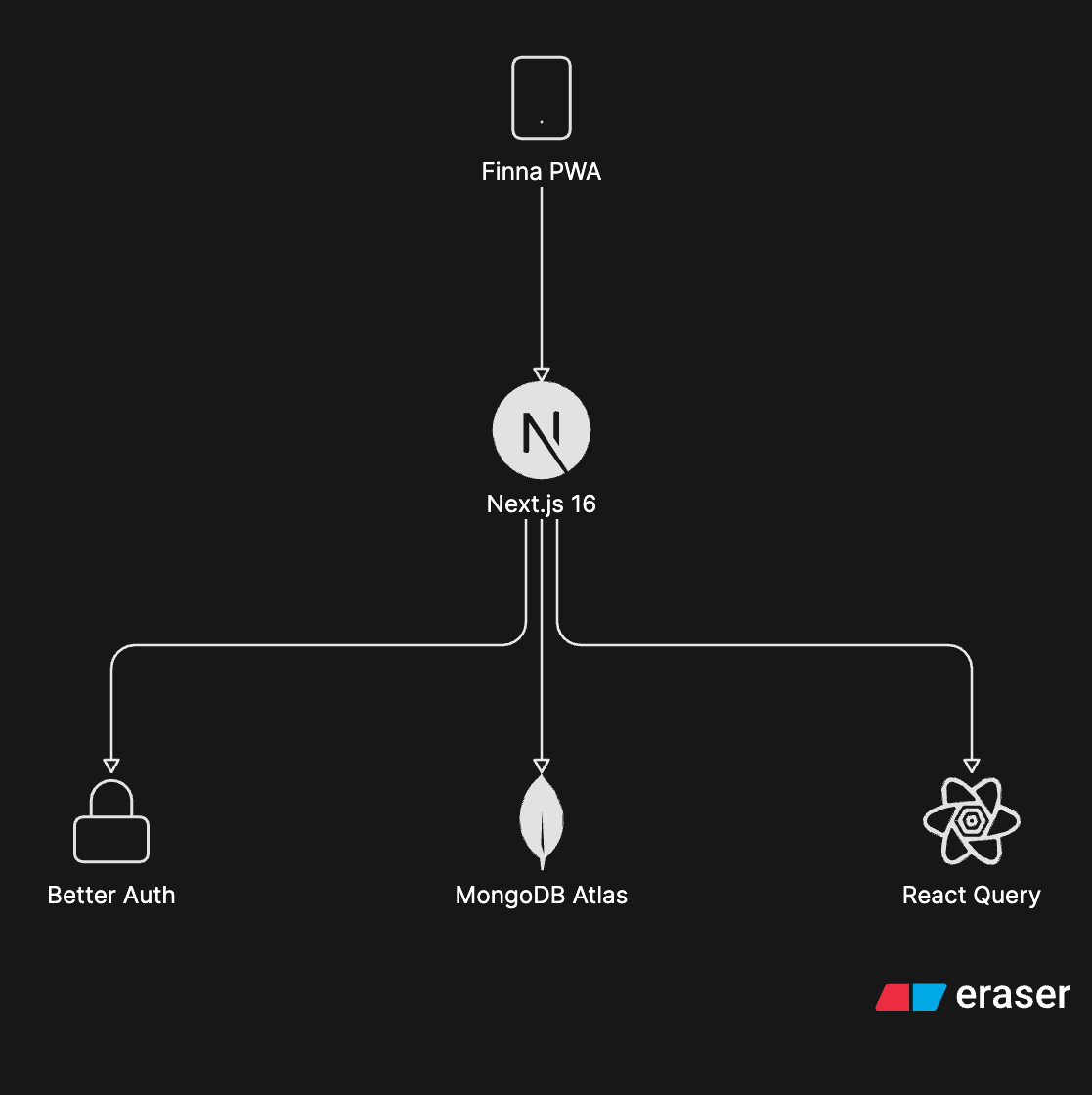
The Final Tech Stack
| Layer | Technology | Why |
|---|---|---|
| Framework | Next.js 16 | Full-stack architecture in one repository |
| Frontend | React 19 | Familiar ecosystem and modern React features |
| Language | TypeScript | Type safety across the application |
| Authentication | Better Auth | Simple Google OAuth and MongoDB integration |
| Database | MongoDB Atlas | Natural fit for budgeting documents |
| ODM | Mongoose 8 | Schema validation and type support |
| Data Fetching | React Query | API caching and server state management |
| Styling | TailwindCSS | Fast UI development |
| Components | shadcn/ui | Accessible and composable components |
| PWA | next-pwa | Foundation for installable mobile experience |
| Hosting | Vercel | Fast deployments and minimal configuration |
One thing I intentionally optimized for was simplicity.
This project did not need twenty different services.
It needed a stack that would let me move quickly while remaining maintainable.
Lessons Learned
This project changed how I think about AI-assisted development.
Not because AI generated code.
Because it forced me to think more carefully about requirements.
Good Requirements Matter More Than Ever
The quality of output was directly tied to the quality of input.
The more clearly I described the problem, the better the implementation became.
The PRD was not documentation.
It was leverage.
Architecture Still Matters
AI can generate code quickly.
It cannot magically fix poor architecture decisions.
Choosing the wrong data model or workflow would have created problems regardless of how the code was generated.
The engineering fundamentals remain the same.
The speed of implementation changes.
Domain Knowledge Is a Massive Advantage
The reason Finna came together quickly is because I already understood the problem deeply.
I had been living with the workflow for years.
I knew where the friction existed.
I knew what mattered.
I knew what could wait.
The AI generated implementation.
The product decisions still came from experience.
AI Is Better as an Accelerator Than a Replacement
The most effective way I have found to use AI is not by asking it to build random applications.
The most effective approach is:
- Understand the problem deeply
- Design the solution
- Define the architecture
- Create constraints
- Let AI accelerate implementation
That combination is incredibly powerful.
What's Next for Finna?
The current version solves the core budgeting problem.
Now the focus shifts to refinement.
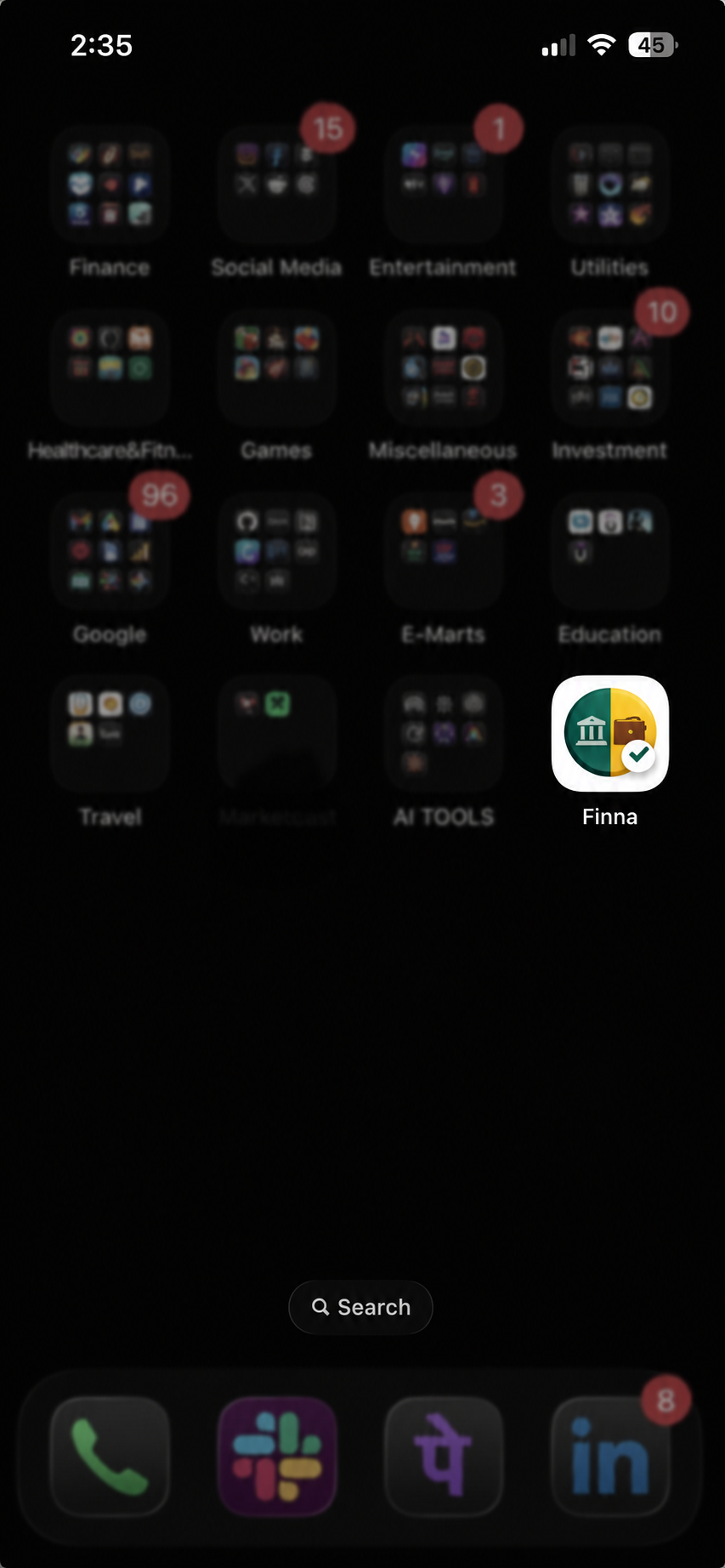
Finna running as an installed PWA on my phone.
Some features already on the roadmap include:
Notifications and Reminders
The checklist system already tracks manual payments.
Adding reminders is a natural next step.
Family and Shared Budgets
Many households manage finances across multiple people.
Supporting shared visibility could make Finna useful beyond personal budgeting.
Offline-First Support
The architecture is already planned.
The implementation still needs to be completed.
React Native Application
One reason I chose a PWA first was validation speed.
If Finna becomes part of my long-term workflow, a dedicated React Native application becomes much easier to justify.
AI-Powered Financial Insights
This is probably the most exciting area.
Imagine being able to ask:
- Where did I spend the most money this month?
- Which expenses increased compared to last month?
- How much discretionary spending do I actually have?
- Which recurring expenses should I review?
Those capabilities become possible once enough financial history exists.
Final Thoughts
Yesterday, I spent roughly five hours building a product I had wanted for years.
The idea was not created yesterday.
The code was.
The spreadsheet that inspired Finna evolved through years of monthly budgeting, recurring payments, account transfers, and financial planning.
What Claude Code enabled was not the idea.
It enabled the implementation.
By combining a clear PRD, specialized agents, architectural constraints, and a structured workflow, I was able to go from concept to production significantly faster than I could have on my own.
The application is still young.
There are features to build.
There are workflows to validate.
There are undoubtedly bugs waiting to be discovered.
But that is not what excites me most.
What excites me is how dramatically the development process has changed.
For years, turning an idea into a working product required finding enough time to implement it.
For the first time, it feels like implementation is becoming the easy part.
If you want to follow the journey, you can check out Finna at:
finance.ghazikhan.inIf you try Finna and have feedback, there is a feedback form inside the app under Settings. Every response directly shapes what gets built next.
And if you are experimenting with AI-assisted development yourself, I would love to hear what workflows are working for you.
Building frontend systems at scale for the past decade. Staff Engineer, occasional writer, and someone who still finds CSS genuinely interesting. Currently helping companies move fast without breaking their architecture.